2026 · NSS Background RemoverAbout 13 min readNovus Stream Solutions
Code-splitting a large web app: how lazy routes keep it fast
A tool app with many surfaces faces one hard question on first load: how much of it does a visitor have to download before they can use the one thing they came for? The honest answer is “almost none of it”, and that is a build decision before it is a clever-code decision.
Contents
- 1.Overview
- 2.First-load JavaScript is the number that matters
- 3.Route-level splitting: one tool, one chunk
- 4.Lazy boundaries inside a route
- 5.The biggest deferral is the AI model, not the code
- 6.Prefetching: hiding the latency you just created
- 7.How to know it actually worked
- 8.What this buys the person who just wants one cutout
- 9.The shared chunk is where splits quietly leak
- 10.Over-splitting is a real failure mode too
- 11.Caching is what makes the split pay off again on every deploy
Overview
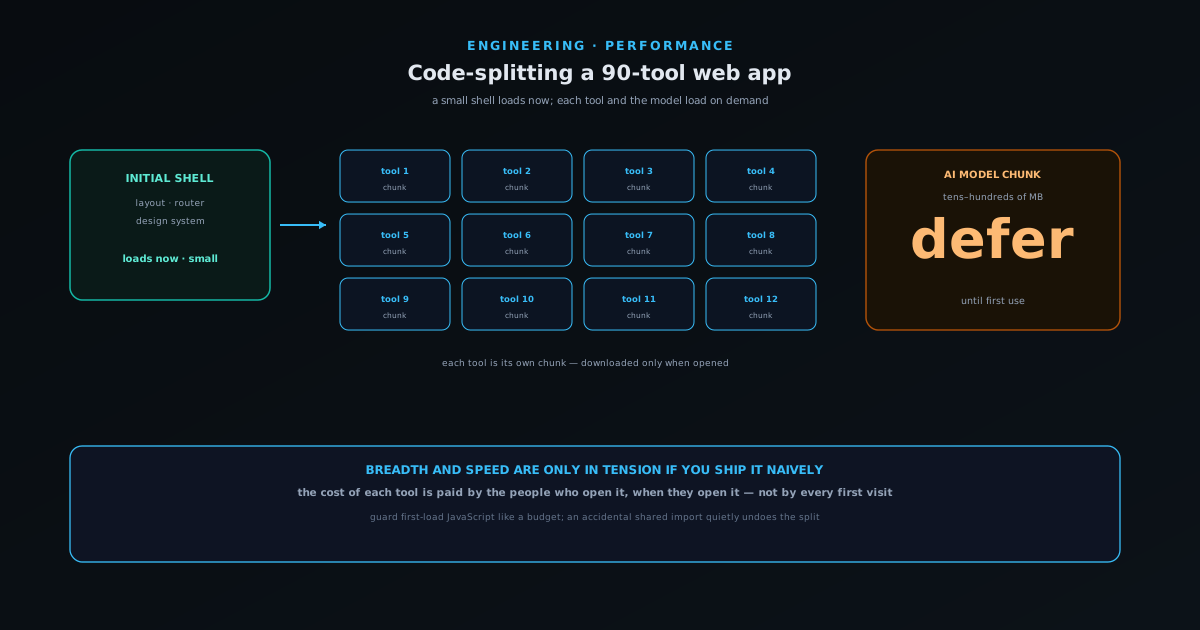
A browser app that offers many different tools has a temptation built into it: because everything lives in one codebase and ships to one URL, the simplest possible build bundles all of it together and serves the whole thing on first load. That is the path of least resistance, and it produces an app that takes several seconds to become interactive even when the visitor only wanted to do one small thing. Someone who arrives to remove the background from a single photo should not have to download the code for the video editor, the image editor, the batch processor, and many other surfaces they will never touch in this session. The whole point of a large tool app is breadth, but breadth is a liability the moment you make every visitor pay for all of it up front.
The fix is code-splitting, and it is worth being precise about what that phrase means because it is easy to treat it as a magic switch. Code-splitting is the practice of breaking one large JavaScript bundle into many smaller pieces — chunks — that the browser downloads only when they are actually needed. Done well, the visitor downloads a small shell that knows how to route and render the one tool they opened, and nothing else, until they ask for something else. This article is about how that works for an app the size of the NSS Background Remover, where the wins are and are not, and how to tell whether your splitting is doing anything at all rather than just rearranging the same payload.
First-load JavaScript is the number that matters
The most common mistake when thinking about app size is to look at the total — “the whole app is four megabytes of JavaScript” — and either panic or shrug. The total is almost irrelevant to how the app feels. The number that governs the experience is first-load JavaScript: how many bytes the browser must download, parse, and execute before the page the visitor landed on becomes interactive. An app can be enormous in total and still feel instant if the first load is small, and it can be modest in total and still feel sluggish if it ships everything at once. Optimising the wrong number is how teams spend a week shaving the total and see no change in the metric users actually feel.
This reframing changes the goal from “make the app smaller” to “make the first load smaller”, which is a much more tractable problem. You do not have to delete features or rewrite everything; you have to arrange the code so that the parts a given entry point does not need are in separate chunks that load later. The breadth stays — all the tools are still there — but the cost of that breadth moves from “paid by everyone on every visit” to “paid by the people who use each tool, when they use it”. That is the entire game, and route-level splitting is the blunt, high-leverage way to win most of it.
Route-level splitting: one tool, one chunk
The coarsest and most valuable split follows the URL structure. Each tool lives at its own route, and modern frameworks will, if you let them, compile each route into its own chunk that loads only when someone navigates there. Open the background remover and you download the background remover’s code; you do not download the video editor’s code until you open the video editor. This maps the technical boundary onto a boundary users already understand — one tool, one page, one download — which is what makes it both effective and easy to reason about. Nothing about the feature set changes; only the timing of the download does.
The reason this is so effective for a large multi-tool app specifically is that the tools are genuinely independent. The upscaler and the video editor share very little code beyond the common shell, so putting them in the same bundle buys nothing and costs the sum of both. Route splitting lets each tool carry its own weight and only its own weight. The shared parts — the layout, the routing, the design system, the upload widget — belong in a common chunk that loads once and is cached, while everything tool-specific is deferred. The art is in drawing that line correctly, which is the next problem.
Lazy boundaries inside a route
Route splitting is the first cut, not the last. Within a single tool there are often heavy sub-features that most users of that tool never open: an advanced settings panel, a rarely-used export format, a secondary editor mode. Bundling those into the tool’s main chunk reintroduces the original problem at a smaller scale — everyone who opens the tool pays for the parts of it they do not use. The answer is a lazy boundary: a point in the component tree where you say “do not load this until it is shown”, so the heavy panel downloads the moment a user actually expands it and not a millisecond before.
The skill here is choosing boundaries that match real usage rather than splitting reflexively. Every lazy boundary adds a tiny amount of complexity and a possible loading state, so splitting a component that is shown to ninety per cent of users just adds a flicker for no benefit. The boundaries that pay are around the genuinely optional and the genuinely heavy: a large dependency used by one feature, a panel most people never open, a code path that only runs for an uncommon file type. A good rule is to split where the probability of use is low and the cost of inclusion is high, and to leave the common, cheap things in the main chunk where they belong.
The biggest deferral is the AI model, not the code
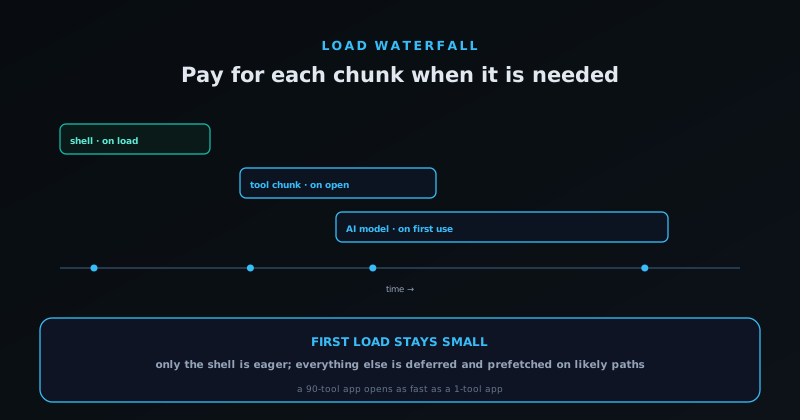
For an app whose tools run real machine-learning models in the browser, the JavaScript is often the smaller half of the weight problem. A background-removal model is tens to hundreds of megabytes — far larger than any code chunk — and the single most important deferral in the whole app is making sure that model does not download until a tool that needs it is actually used. A visitor who lands on a tool that needs no model should never trigger a model download, and even on a tool that does, the model fetch should begin when the user commits to an action, not on page load, so the interface is usable while it streams in.
This is a different mechanism from code-splitting but the same principle: pay for the heavy thing only when the heavy thing is needed. The models cache after first download, so the cost is paid once and the tool works offline afterward — but that first-use timing is what keeps the initial experience light. Treating the model as just another lazily-loaded asset, gated behind genuine intent and accompanied by an honest progress indicator, is what lets a privacy-first on-device app stay fast to open despite carrying capabilities that would be impossible to ship eagerly. The broader story of why those models live on the device at all is in How big are in-browser AI models (and why size matters).
Prefetching: hiding the latency you just created
Splitting code introduces a new cost — a small delay when a user navigates to a chunk that is not yet downloaded — and the naive version of lazy loading makes that delay visible as a spinner on every navigation. The technique that hides it is prefetching: quietly downloading a chunk before the user asks for it, using a signal that they are about to. Hovering a link, scrolling a tool into view, or simply being idle after the initial load are all good moments to fetch the next likely chunk in the background, so that when the click comes the code is already there and the navigation feels instant.
The judgement is in not over-prefetching, because prefetching everything is just eager loading with extra steps and throws away the win you split for. The sensible default is to prefetch the few destinations a user is most likely to reach next — the tools linked from the current page, the obvious next step in a workflow — and to let everything else stay deferred until genuinely requested. On a connection the browser reports as slow or metered, prefetching should back off entirely. The goal is the feeling of a single eagerly-loaded app with the actual download profile of a lazily-loaded one, and prefetching the high-probability paths is how you get most of that illusion cheaply.
How to know it actually worked
Code-splitting is unusually easy to do without doing anything, because the build still succeeds and the app still works whether or not the chunks are meaningfully separated. The only way to know is to measure, and the measurement that counts is first-load JavaScript on a real entry point, watched over time so a regression shows up before it ships. A build report that lists the bytes each route loads on first paint is the single most useful artifact here; if opening one tool quietly pulls in three others because of an accidental shared import, that report is where it becomes visible. We treat that as a number to defend, the same way the build-time checks in A build-time validation gate: catching content errors before deploy defend content quality.
The most common failure mode is the accidental dependency: one import in a shared file that drags a heavy module into the common chunk, so a deferral you thought you had quietly evaporated. These do not announce themselves — the app works fine, just slower than it should — which is exactly why a measured budget beats a one-time optimisation. Splitting is not a task you finish; it is a property you maintain, and the way you maintain it is by watching the first-load number and treating an unexplained jump as a bug rather than a rounding error. Get that habit in place and a large multi-tool app stays as fast to open as a one-tool app, which is the whole point of doing any of this.
What this buys the person who just wants one cutout
All of this machinery exists to serve a very ordinary moment: someone arrives with one photo and one job, and the app is ready before they have finished reading the headline. They never see the chunks, the prefetch, or the deferred model logic; they see a tool that opened fast and did the thing. The breadth that makes the app worth bookmarking — the many other tools — is still there the moment they want it, downloaded just in time and cached for next time, without ever having taxed the first visit.
That is the quiet thesis of code-splitting a large app: breadth and speed are only in tension if you ship them naively. Arrange the code so the cost of each capability is paid by the people who use it, when they use it, and a sprawling tool suite can feel as light as a single-purpose utility. The discipline is unglamorous — draw the boundaries where usage actually divides, defer the heavy assets behind real intent, and guard the first-load number like it matters, because it is the one users feel. You can see the result by opening the app and watching what the network actually downloads before you do anything at all.
Over-splitting is a real failure mode too
It is possible to swing too far the other way. Every chunk is a separate network request with its own overhead, and a tool whose code is shattered into dozens of tiny lazily-loaded fragments can end up slower than a sensibly-bundled one, because the browser spends its time negotiating requests and waiting on a dependency waterfall — chunk A loads, discovers it needs chunk B, which discovers it needs chunk C — instead of downloading one reasonably-sized payload in parallel. Splitting is a tool for deferring code the visitor does not need yet, not a virtue to maximise, and treating “more chunks” as automatically better produces an app that is technically split and practically sluggish.
The useful mental model is that you are choosing where to put boundaries, and each boundary has a cost as well as a benefit. A boundary pays when it defers something heavy that a given visitor probably will not use; it costs when it adds a request and a possible loading state for something they almost certainly will. So the sensible shape is a handful of meaningful splits — per route, and around the few genuinely heavy optional features — rather than a fog of micro-chunks. The goal is the smallest first load that still arrives in as few round-trips as the content allows, and that is a balance, not a direction you push to the limit.
Caching is what makes the split pay off again on every deploy
There is a second, less obvious payoff to splitting that shows up over the life of the app rather than on a single visit. When the build gives each chunk a content-based hash in its filename, the browser can cache each chunk indefinitely, because a chunk’s URL only changes when its contents change. That turns a deploy from “everyone re-downloads the whole app” into “everyone re-downloads only the chunks that actually changed”. Fix a bug in one tool and ship it, and returning visitors fetch that one small chunk while every other chunk — the shell, the many other tools, the shared code — is served from cache untouched. A monolithic bundle has the opposite property: change one line anywhere and the single hashed bundle’s URL changes, so everyone re-downloads everything.
This is why splitting and caching are really one strategy rather than two. The split gives you many independently-cacheable units; the content hashing gives each unit a stable identity; together they mean the cost of an update is proportional to the size of the change, not the size of the app. For a tool suite that ships frequently — a fix here, a new tool there — that property is enormous, because it keeps repeat visits fast even as the app evolves. The same care that keeps first-load JavaScript small therefore keeps update cost small too, and both come from the same habit of drawing chunk boundaries that match how the code actually changes and how visitors actually use it.
Frequently asked questions
Quick answers to common questions about this topic.
What is the difference between code-splitting and lazy loading?
They are two halves of the same idea. Code-splitting is the build-time step of breaking one bundle into several chunks; lazy loading is the run-time step of fetching a chunk only when it is needed. You split the code so that you have something to lazily load. In practice you configure split points (usually per route or around a heavy component) and the framework handles fetching each chunk on demand.
Does code-splitting make the total app size smaller?
No — it usually makes the total slightly larger, because of the extra chunk boundaries. What it shrinks is the first-load JavaScript: the bytes a visitor must download before the page they landed on becomes interactive. That is the number that governs how fast the app feels, so optimising it rather than the total is the point.
How should I decide where to split?
Start with routes — one tool or page per chunk — because that boundary maps cleanly onto how users navigate and how independent the code already is. Then add finer lazy boundaries only around features that are both heavy and infrequently used: a large optional panel, a rarely-needed export format, a big dependency used by one feature. Do not split common, cheap components; you only add a loading flicker for no gain.
How does this relate to loading large AI models?
It is the same principle applied to a much bigger asset. A browser-based AI model can be tens to hundreds of megabytes, far larger than any code chunk, so the highest-value deferral is making sure that model downloads only when a tool that needs it is actually used — ideally on a deliberate user action — and then caching it so the cost is paid once.
How do I avoid accidentally undoing my code-splitting?
Measure first-load JavaScript per route in your build output and treat an unexplained increase as a bug. The usual culprit is an accidental import in a shared file that pulls a heavy module into the common chunk. The app keeps working, just slower, so without a measured budget the regression is invisible — a per-route byte report is what makes it visible before it ships.