2026 · NSS Background RemoverAbout 13 min readNovus Stream Solutions
Web Workers and OffscreenCanvas: keeping the UI smooth during heavy AI work
Everything a web page does — every click, scroll, and animation — runs on one main thread by default, including any heavy work you put there. Run a model or a video render on that thread and the page freezes. Web Workers and OffscreenCanvas are how you keep the interface alive while the heavy work happens.
Contents
- 1.Overview
- 2.Why one blocked thread freezes everything
- 3.What a Web Worker actually is
- 4.The data-transfer trap, and how to avoid it
- 5.OffscreenCanvas: letting a worker draw
- 6.The honest cost: complexity
- 7.What the user feels
- 8.Reuse the worker; do not spawn one per task
- 9.Load the model once, inside the worker, and keep it warm
- 10.Plan for debugging across the boundary
- 11.Feature-detect and degrade gracefully
Overview
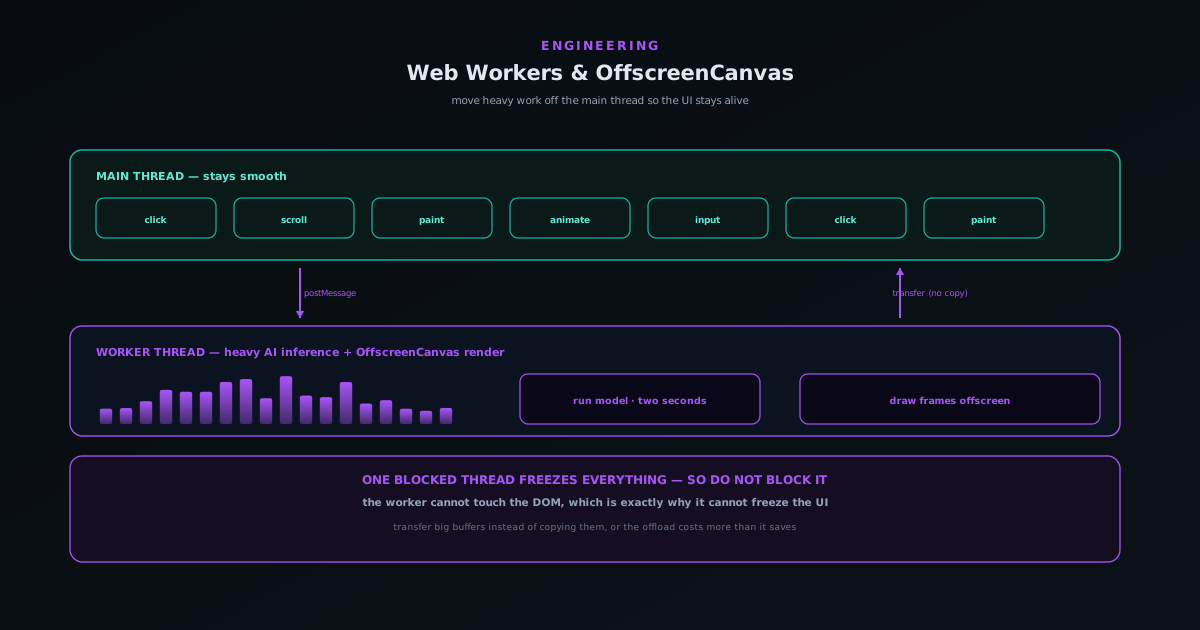
A web browser runs the code for a page on a single main thread, and that thread does almost everything: it responds to clicks, runs animations, lays out and paints the page, and executes your JavaScript. The crucial consequence is that the thread can only do one thing at a time. If you hand it a task that takes two seconds — running a machine-learning model over an image, encoding a frame of video, processing a large file — then for those two seconds it cannot respond to anything. Buttons do not depress, scrolling locks, the cursor stops, the whole page appears frozen. It is not actually broken; it is busy, and being busy on the main thread is indistinguishable from being broken as far as the user is concerned.
For an app whose entire premise is doing heavy work in the browser — removing backgrounds with a real model, rendering a beat-synced video, restoring a photo — this is the central engineering constraint. The capability that makes the app worth using is exactly the thing that would freeze it if you put it in the obvious place. Web Workers and OffscreenCanvas are the standard answer: they let you move heavy work onto separate threads so the main thread stays free to keep the interface alive. This article is about what those two technologies actually do, how data moves between threads without killing the benefit, and when the added complexity is worth it.
Why one blocked thread freezes everything
It helps to understand the mechanism rather than just the rule, because the mechanism tells you exactly what to move and what to leave. The browser maintains an event loop on the main thread: a queue of tasks — a click handler here, an animation frame there, your function call next — that it works through one at a time. Each task runs to completion before the next begins. A click that arrives while a long task is running does not interrupt it; it waits in the queue until the long task finishes. So a single function that takes two seconds does not slow the page down by a little, it stops the page for two seconds, because every other task — including the repaint that would show a spinner — is stuck behind it in the same queue.
This is why the usual half-measures do not help. Showing a loading spinner before you start the heavy work does not work if the work is on the main thread, because the browser never gets a chance to paint the spinner until the work is done — by which point you do not need it. Breaking the task into chunks and yielding between them helps a little but turns simple code into a state machine and still steals time from the thread that should be handling input. The only real fix is to get the heavy work off the main thread entirely, onto a thread whose being busy does not block the interface. That thread is a Web Worker.
What a Web Worker actually is
A Web Worker is a separate JavaScript thread with its own execution context, running in parallel with the main thread. You hand it a script, it runs independently, and crucially it does not share the main thread’s event loop — so when a worker spends two seconds running a model, the main thread is completely unaffected and keeps handling clicks and animations the whole time. The worker cannot touch the page directly: it has no access to the document, the DOM, or the elements on screen. That restriction sounds limiting but is the entire point — by being unable to touch the UI, the worker cannot block it, and the wall between them is what keeps the interface responsive.
Communication between the two happens by message passing. The main thread posts a message to the worker — “here is an image, run the model on it” — and the worker posts a message back when it is done — “here is the result”. Each side registers a handler for incoming messages and they talk asynchronously, never sharing variables directly. This message-passing model is what keeps the parallelism safe: there is no shared mutable state to corrupt, just messages crossing a boundary. The mental model is two people in separate rooms passing notes under the door, rather than two people reaching into the same drawer at once, and that separation is exactly why it works.
The data-transfer trap, and how to avoid it
There is a catch that turns the naive version of this into a performance trap. By default, when you post a message to a worker, the data is copied — serialized on one side and rebuilt on the other. For a small message that is nothing, but for a large image or a multi-megabyte buffer, copying it across the boundary can cost as much as the work you were trying to offload, and it briefly doubles the memory used. Offloading the model run only to spend the saved time copying the image back and forth is a real way to make things slower while feeling clever, and it is the mistake that sours teams on workers.
The fix is transferable objects. Instead of copying certain kinds of data — array buffers, image bitmaps, offscreen canvases — you transfer ownership of them to the worker. The underlying memory is handed over rather than duplicated: it becomes unusable on the sending side and available on the receiving side, with no copy and no doubling. This makes passing a large image to a worker nearly free, which is what makes the whole architecture pay off for image and video work. Knowing which data is transferable, and structuring your messages so the heavy payloads are transferred rather than copied, is most of the practical skill in using workers well.
OffscreenCanvas: letting a worker draw
Web Workers solve computation, but they create a second problem for anything visual. A worker cannot touch the DOM, and a canvas element is part of the DOM, so a worker cannot draw to the screen directly. For an app that renders video frames or composites images, that is a serious limitation — the rendering is precisely the heavy, frame-by-frame work you want off the main thread, but the canvas it draws into lives on the main thread the worker is forbidden from touching. Without a bridge, you are forced to do the rendering on the main thread after all, which puts you right back where you started.
OffscreenCanvas is that bridge. It lets you detach a canvas’s drawing surface from the DOM and transfer it to a worker, which can then draw to it directly, on its own thread, with the results appearing on screen without ever involving the main thread in the per-frame work. For a music visualizer rendering sixty frames a second or an editor compositing layers, this is what makes smooth playback possible while the rest of the interface — the controls, the timeline, the buttons — stays fully responsive on the main thread. The rendering and the interaction genuinely happen in parallel, which is the only way both can stay smooth at once, and it is why the export engine described in Why the preview now matches the export: rebuilding a music-visualizer render engine can keep the preview fluid while it works.
The honest cost: complexity
None of this is free, and the cost is complexity. Code split across threads is harder to write, harder to debug, and harder to reason about than code that runs in one place. Everything becomes asynchronous and message-based: you cannot just call a function and get a result, you post a message and wait for one, and errors that would be a simple thrown exception on one thread become messages you have to route and handle across the boundary. Debugging spans two contexts, and a bug caused by the order in which messages arrive is a genuinely harder thing to chase than a bug in straight-line code. This is real overhead, and it is why you should not reflexively put everything in a worker.
The judgement is to move the heavy, isolatable work and leave everything else where it is simple. Model inference, video encoding, large image processing, parsing a big file — these are bounded tasks with a clear input and output, which makes them ideal worker candidates: the complexity of the boundary buys you a responsive UI during work that would otherwise freeze it. Light, frequent, UI-coupled logic should stay on the main thread, because moving it adds boundary complexity for no real gain. The same restraint applies here as with reliability work in Reliability hardening: device lifecycle, model integrity, and honest failures: add the machinery where it earns its keep, and resist it everywhere it does not.
What the user feels
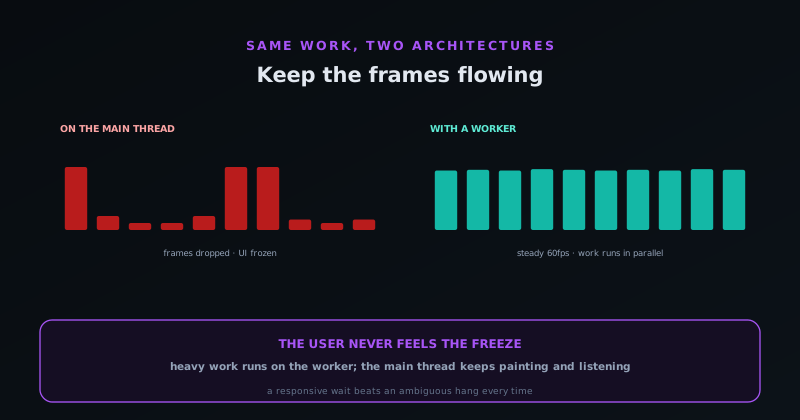
The reward for all this is that the user never experiences the heavy work as a freeze. They start a background removal and can still scroll the page, read the help text, or queue up the next image while the model runs. They watch a visualizer preview play smoothly while they drag a slider. The work still takes as long as it takes — moving it to a worker does not make the model faster — but the interface stays alive throughout, and an app that stays responsive while it works feels dramatically more trustworthy than one that goes dead and makes the user wonder if it has crashed.
That perceived liveness is the whole return on the architecture. A frozen interface during a two-second task is not just unpleasant; it is ambiguous, because the user cannot tell a busy app from a broken one, and ambiguity is what makes people give up and reload. Keeping the main thread free turns a frightening freeze into a visibly-working wait, and a visibly-working wait is something users will happily sit through. The threading is invisible; what they notice is that the app never stops listening to them, which is exactly the impression a heavy in-browser tool needs to make.
Reuse the worker; do not spawn one per task
A naive worker setup creates a fresh worker for each job and tears it down when the job finishes, and on the surface that looks clean. In practice it is wasteful, because spinning up a worker has real cost: the browser has to create the thread, load and parse the worker’s script, and — for an AI tool — re-initialise whatever the worker needs to do its job. Pay that startup tax on every single operation and you have added latency to exactly the interactions you were trying to speed up, with the first frame of every task spent booting a thread instead of doing work. The cost is invisible in a demo with one click and very visible when a user processes a batch.
The better pattern is a long-lived worker, or a small pool of them, kept warm and handed tasks as they arrive. The thread is created once, the script is parsed once, and the expensive initialisation happens once; thereafter each job is just a message in and a result out, with none of the setup overhead. A pool of a few workers also lets genuinely parallel work — processing several images at once — actually run in parallel across cores, which a single worker cannot. The judgement is to size the pool to the hardware rather than spawning without limit, because too many workers competing for too few cores just adds scheduling overhead. Reusing workers is the difference between an architecture that is fast once and one that stays fast under repeated use.
Load the model once, inside the worker, and keep it warm
For an app that runs a real model, where that model lives matters as much as where the inference runs. The natural home is inside the worker: the worker loads the model once, holds it in memory, and reuses it across every request it receives. That keeps the multi-megabyte weights and the initialised runtime entirely off the main thread, and it means the heavy one-time cost of preparing the model is paid a single time rather than per operation. A user’s first removal pays for the model load; every subsequent one is just inference against an already-warm model, which is why the second image always feels faster than the first.
This also composes cleanly with the deferral story from the code-splitting side of the house: the worker and its model are loaded only when a tool that needs them is actually opened, not on first page load, so a visitor who never touches an AI tool never pays for the model at all. Once loaded, keeping the worker alive keeps the model warm for the rest of the session, so the architecture front-loads the cost onto genuine intent and then amortises it across everything that follows. The combination — defer until needed, load once, keep warm — is what lets a privacy-first on-device tool feel responsive despite carrying capabilities that are expensive to initialise. The expense is real; the trick is paying it exactly once, at the right moment.
Plan for debugging across the boundary
The complexity cost of workers is most acute when something goes wrong, because an error in a worker does not surface the way an error on the main thread does. A thrown exception in a worker will not crash the page or appear in the obvious place; if you have not arranged to catch it and post it back, it simply vanishes, leaving a task that never completes and a UI waiting forever for a result that is not coming. So part of using workers well is treating error handling as a first-class part of the message protocol: every job that can fail needs a defined failure message, and the main thread needs to handle it as deliberately as it handles success.
The same goes for the cases that are not clean successes or failures — a job that hangs, a device that runs out of memory mid-task, a result that arrives after the user has already moved on. A robust worker protocol gives every request an identity so late or duplicate results can be matched up or discarded, and a timeout so a job that never reports back becomes a clear, surfaced failure rather than a silent hang. This is more bookkeeping than single-threaded code needs, and it is exactly the overhead that makes workers worth reserving for heavy work that earns it. But once the protocol is in place — defined messages, request identities, timeouts, explicit failures — the threading becomes something you can reason about and observe, rather than a black box that occasionally swallows a task without a trace.
Feature-detect and degrade gracefully
Not every browser and device offers every capability this architecture leans on, and an app that assumes them will break for the users who lack them rather than serving them a lesser experience. The honest posture is to feature-detect rather than assume: check at runtime whether the environment actually supports the worker features, the transfer mechanisms, and the offscreen rendering you want to use, and have a defined path for when it does not. The goal is not to guarantee every device gets the fastest path, but to guarantee no device gets a broken one — a tool that works smoothly where the capabilities exist and still works, more modestly, where they do not.
In practice graceful degradation usually means a slower fallback rather than a missing feature. Where OffscreenCanvas is unavailable, rendering can fall back to the main thread and accept some jank rather than failing outright; where a particular transfer path is not supported, a copy is slower but still correct. The user on the capable device gets the responsive experience the worker architecture was built for, and the user on the older or stricter one still gets a working tool, just without the smoothness. Detecting capabilities and degrading deliberately is what keeps the responsiveness work from becoming an exclusion: the heavy machinery is an enhancement layered on top of a baseline that functions everywhere, not a hard requirement that quietly drops the long tail of devices.
Frequently asked questions
Quick answers to common questions about this topic.
When should I use a Web Worker instead of just running the code normally?
Use a worker for heavy, bounded tasks with a clear input and output — model inference, video encoding, large image processing, parsing a big file — that would otherwise block the main thread for more than a frame or two. Keep light, frequent, UI-coupled logic on the main thread, because moving it adds message-passing complexity for no real responsiveness gain.
Why does my app still freeze even though I added a loading spinner?
Because the spinner and the heavy work are on the same thread. The browser cannot paint the spinner until the current task finishes, so if the heavy work runs on the main thread the spinner only appears after the work is already done. The fix is to move the heavy work to a worker so the main thread is free to paint the spinner and respond to input while the work runs.
What are transferable objects and why do they matter?
By default, data sent to a worker is copied, which is expensive for large payloads like images and briefly doubles memory. Transferable objects — array buffers, image bitmaps, offscreen canvases — are instead handed over by reference: the memory moves to the worker with no copy, becoming unusable on the sender side. Using transfer rather than copy for big payloads is what makes offloading image and video work actually faster.
What is OffscreenCanvas for?
A worker cannot touch the DOM, and a normal canvas is part of the DOM, so a worker cannot draw to the screen directly. OffscreenCanvas lets you transfer a canvas’s drawing surface to a worker so it can render directly on its own thread — essential for smooth per-frame rendering, like a video export or a visualizer, while the main thread stays responsive to controls.
What is the main downside of using workers?
Complexity. Code split across threads is asynchronous and message-based, harder to debug, and spans two contexts, and errors must be routed across the boundary rather than simply thrown. That overhead is worth it for genuinely heavy, isolatable work, which is why you should move those tasks to a worker and leave simple, UI-coupled logic on the main thread.